- DATE:
- AUTHOR:
- The Cotality Mercury Network team

Collateral Investigate release: Appraiser ratings, multi-column checklists, ROV upgrades, and assignment flexibility
This October 21, 2026 production release expands review and ROV capabilities, introduces appraiser ratings and enhanced checklist layouts, and provides greater flexibility for assignment, reporting, and Helpdesk administration. It also improves PDF-order identification, audit logging, responsive design, and rule quality, and fixes to strengthen assignment accuracy, artifacts, and review workflows.
What's new
Review and ROV enhancements
ROV tiers now support both checklists and findings, giving reviewers a more complete, consistent review experience.
Review finding comments are now better maintained as revisions are received, helping preserve important review context throughout the revision lifecycle.
Properly permissioned users can now cancel an escalation when appropriate.
Appraiser ratings (see screenshots)
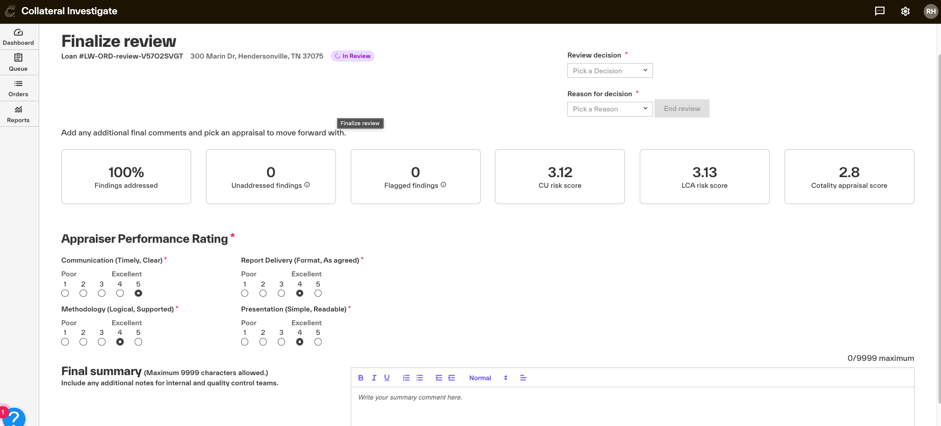
Added a 1–5 appraiser rating as part of review finalization.
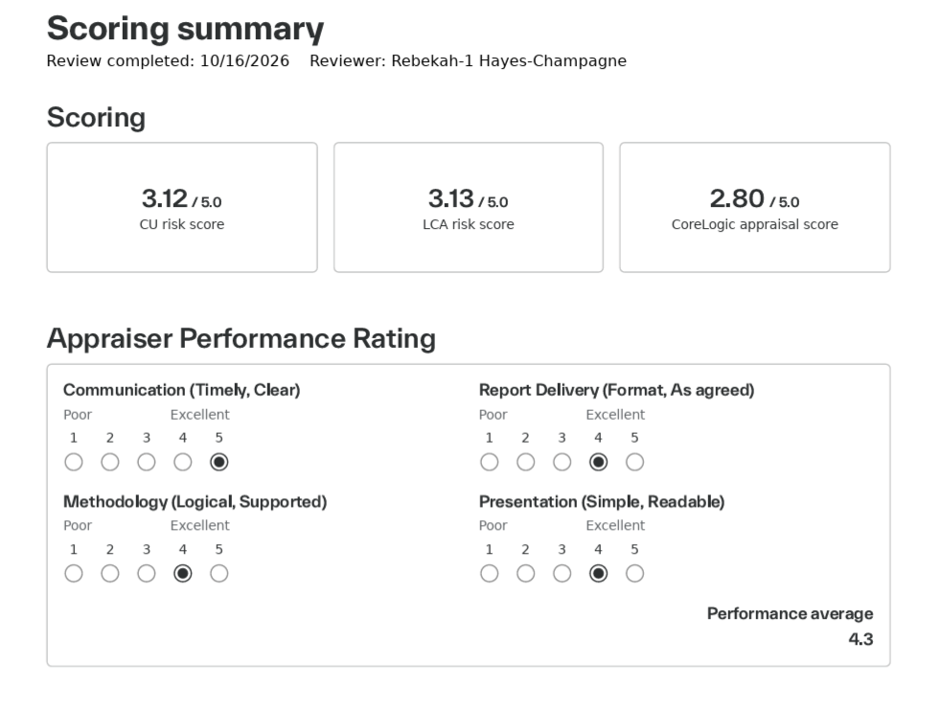
Appraiser ratings are included in applicable PDF artifacts and outbound platform information, providing greater visibility into review outcomes.
Checklist enhancements (see screenshots)
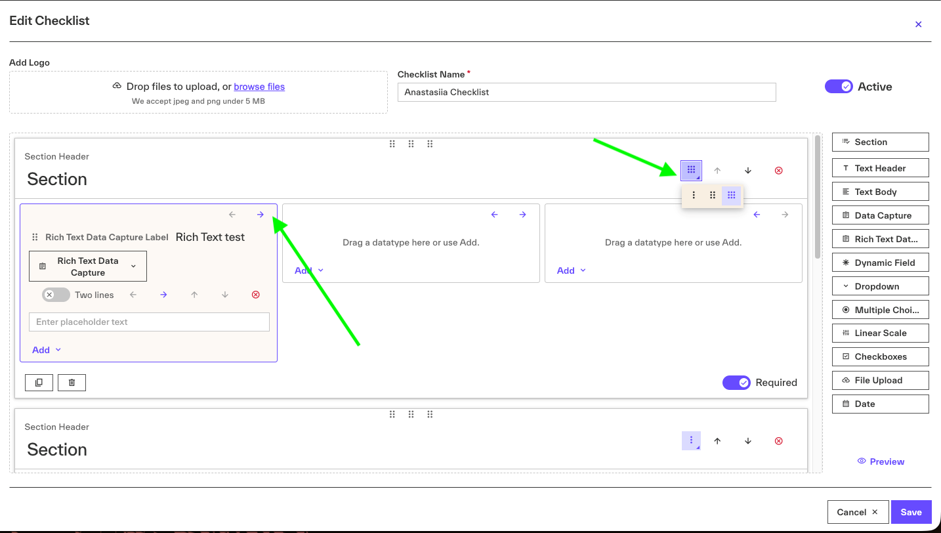
Checklist sections can now be configured with multi-column layouts. The selected layout is reflected in the checklist builder, preview, and PDF output.
Assignment enhancements (see screenshots)
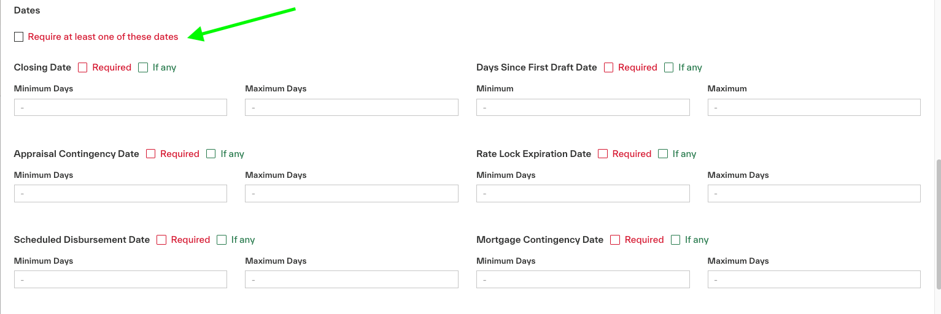
Added a Require any option to date-based assignment criteria, giving you more flexibility when configuring assignment logic.
Helpdesk enhancements
Added PNG screenshot export capabilities for Cerebra answers and assignment log results, making it easier to capture and share troubleshooting information.
Added client-support tools to manage channels, customers, and order attributes in Collateral Helpdesk.
PDF order enhancements
Added visual indicators to make PDF orders easier to identify throughout Collateral Investigate.
Enhanced the Order Details experience to better support PDF-specific orders and information.
What's changed or improved
Review and ROV enhancements
ROV tiers now support both checklists and findings, giving reviewers a more complete, consistent review experience.
Review finding comments are now better maintained as revisions are received, helping preserve important review context throughout the revision lifecycle.
Properly permissioned users can now cancel an escalation when appropriate.
Appraiser ratings (see screenshots)
Added a 1–5 appraiser rating as part of review finalization.
Appraiser ratings are included in applicable PDF artifacts and outbound platform information, providing greater visibility into review outcomes.
Checklist enhancements (see screenshots)
Checklist sections can now be configured with multi-column layouts. The selected layout is reflected in the checklist builder, preview, and PDF output.
Assignment enhancements (see screenshots)
Added a Require any option to date-based assignment criteria, giving you more flexibility when configuring assignment logic.
Helpdesk enhancements
Added PNG screenshot export capabilities for Cerebra answers and assignment log results, making it easier to capture and share troubleshooting information.
Added client-support tools to manage channels, customers, and order attributes in Collateral Helpdesk.
PDF order enhancements
Added visual indicators to make PDF orders easier to identify throughout Collateral Investigate.
Enhanced the Order Details experience to better support PDF-specific orders and information.
What's fixed
Fixed an issue where empty assignment details could be sent to integrated platforms.
Fixed assignment processing to ensure tier priority is applied correctly when multiple tiers are valid.
Fixed an issue where an order could fail to move into the appropriate tier after assignment logic completed.
Fixed an issue where ROV processing could overwrite a reviewer assignment received from an integrated platform.
Fixed incorrect Uploaded by information for files in Associated Files.
Fixed sorting issues within the Associated Files table.
Fixed discrepancies between findings and comments shown across versions in final artifacts.
Fixed an issue affecting the CU score display on the finalization screen.
Fixed incorrect field highlighting within the form viewer for selected findings.
Fixed a UAD rule affected by previous dwelling-related rule updates.
Fixed rule execution issues identified through ongoing analysis of rules that were not firing as expected.
Fixed an Audit Log tooltip display issue that could cut off information.
Fixed various frontend quality, usability, and platform reliability issues.
Support
If you encounter any issues or have feedback during UAT testing, please submit a ticket here.
New feature screenshots
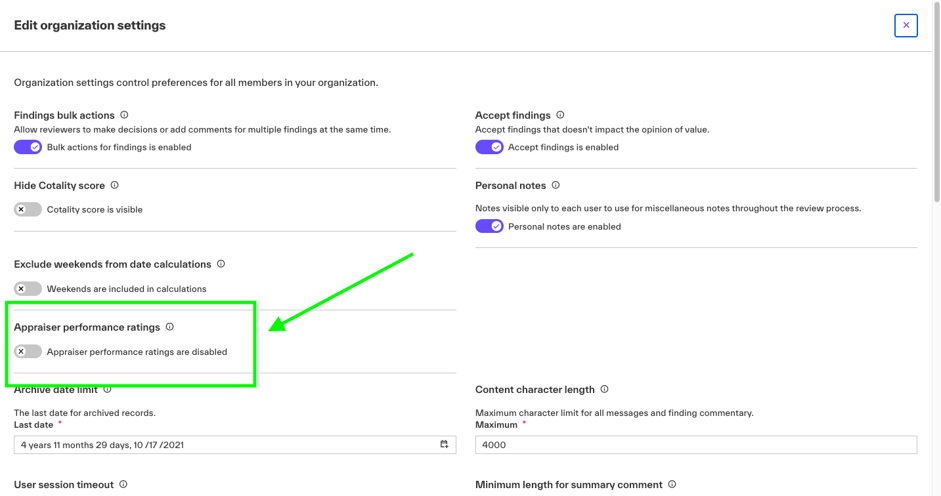
In organization settings, you can now turn on Appraiser performance ratings. When this toggle is enabled, it becomes a required step on the Finalize review screen. To see the Appraisal performance ratings in your Review Artifact, you will need to include the Scoring Summary.
You can now use checklist columns to further improve documentation. Go to the Checklist builder and create a new checklist or edit an existing one. (Changes to the current checklist will only apply to new files that have not been reviewed at the time of change.) In the top right corner of each Section, click the columns icon and choose up to three columns for that section. Then use the arrows to move individual fields within the columns.
You can now use all applicable date thresholds, but each file can use only one while still tiering appropriately. Go to Assignment settings, Edit a tier or Create a new one and select the Require at least one of these dates checkbox.