- DATE:
- AUTHOR:
- The Cotality Mercury Network team

Distinguishing legacy vs UAD 3.6 appraisal orders in Mercury Network
Mercury Network is introducing clear indicators to help appraisers quickly distinguish between legacy appraisal assignments (1004, 2055, etc.) and new UAD 3.6 orders. These updates span visual badges, email notifications, and additional data fields on your order summary screen.
 Key differences at a glance
Feature/indicator | Legacy form orders | UAD 3.6 orders |
|---|---|---|
Visual badge | Displays a prominent "Legacy Form" badge on the order. | No legacy badge; as the new ”normal” assignment, it displays standard layout. |
Order summary screen | Product name includes Legacy form numbers (ex: 1004, 2055); standard summary fields | UAD 3.6 product name; includes new UAD 3.6 descriptive fields such Product Type, Construction Method, ADU Count, and Land Owned in Common. |
Email notifications | Notates "Legacy Form" in the email body | Does not indicate “Legacy Form” |
 What to look for on-screen
To verify your assignment type and format requirements, follow the steps below:
1. Examine product name
Legacy orders have a product name that includes one of the static legacy appraisal forms (1004, 2055, etc).
UAD 3.6 orders will always have a product name that is a combination of the Assignment Type and Property Type. For example, Traditional Appraisal – Single Family.
UAD 3.6 Assignment types:
Traditional appraisal | Requires an on-site, physical inspection of both the interior and exterior |
Desktop appraisal | Completed using available public records, MLS data, and third-party sources without an on-site physical inspection |
Exterior appraisal | Visually inspect the exterior areas of the property |
Hybrid appraisal | Relies on an independent collection of property data |
UAD 3.6 Property types:
Single Family | Cooperative |
Two to Four Family | Other |
Condominium |
UAD 3.6 Product names:
Traditional Appraisal - Condominium | Exterior Appraisal - Condominium |
Traditional Appraisal - Cooperative | Exterior Appraisal - Cooperative |
Traditional Appraisal - Manufactured Home | Exterior Appraisal - Manufactured Home |
Traditional Appraisal - Other | Exterior Appraisal - Other |
Traditional Appraisal - Single Family | Exterior Appraisal - Single Family |
Traditional Appraisal - Two To Four Family | Exterior Appraisal - Two To Four Family |
Desktop Appraisal - Condominium | Hybrid Appraisal - Condominium |
Desktop Appraisal - Cooperative | Hybrid Appraisal - Cooperative |
Desktop Appraisal - Manufactured Home | Hybrid Appraisal - Manufactured Home |
Desktop Appraisal - Other | Hybrid Appraisal - Other |
Desktop Appraisal - Single Family | Hybrid Appraisal - Single Family |
Desktop Appraisal - Two To Four Family | Hybrid Appraisal - Two To Four Family |
Restricted Appraisal Update | |
Completion Report |
2. Order summary
Check for additional UAD 3.6 specific fields. The following fields will only be present on a UAD 3.6 order:
Product Type
ADU
Construction Method
Living units excluding ADU
Land owned in common
PUD indicator
3. Coming November 4, 2026: Look for a green badge
All orders requiring the static legacy appraisal forms will have a green "Legacy Form" badge next to the product name for quick recognition. If the order does not have a green “Legacy Form” badge, it is a UAD 3.6 order to be completed using the new dynamic URAR.
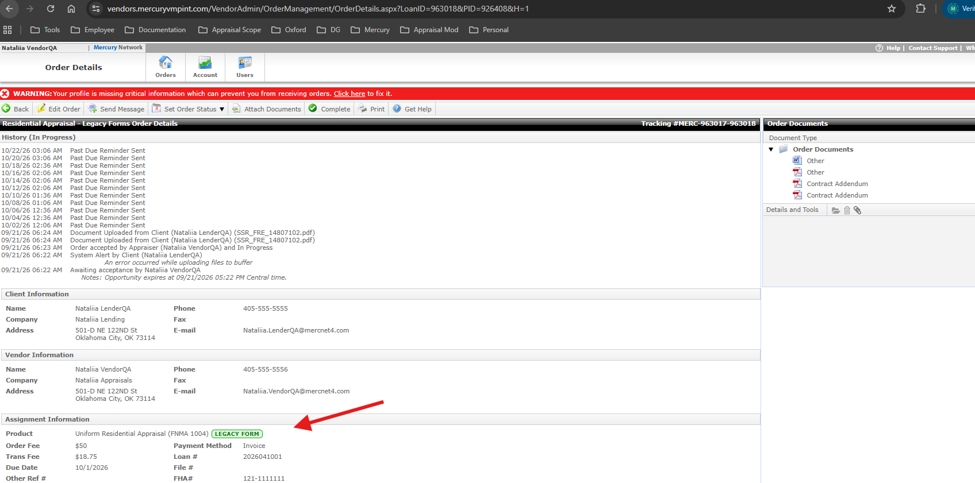
4. Coming soon: Notification email alerts
Look for the "Legacy Form" notation in your initial assignment notification email.
CMS Support
Weekdays: 7 a.m.- 7 p.m. CST
Phone: 888-963-3330
Email: fncsupport@cotality.com