- DATE:
- AUTHOR:
- The Cotality Mercury Network team

Collateral Investigate update: New features for ROV, checklists, appraiser ratings, and artifact filtering
This October 16, 2026 Collateral Investigate UAT release expands capabilities across ROV, checklists, PDF orders, assignment logic, artifacts, and finalization. It also improves rules processing, revision workflows, associated files, audit logging, and the overall user experience.
What's new
ROV checklist and findings support
ROV tiers now support checklists and findings, extending Collateral Investigate’s review functionality to additional ROV workflows.
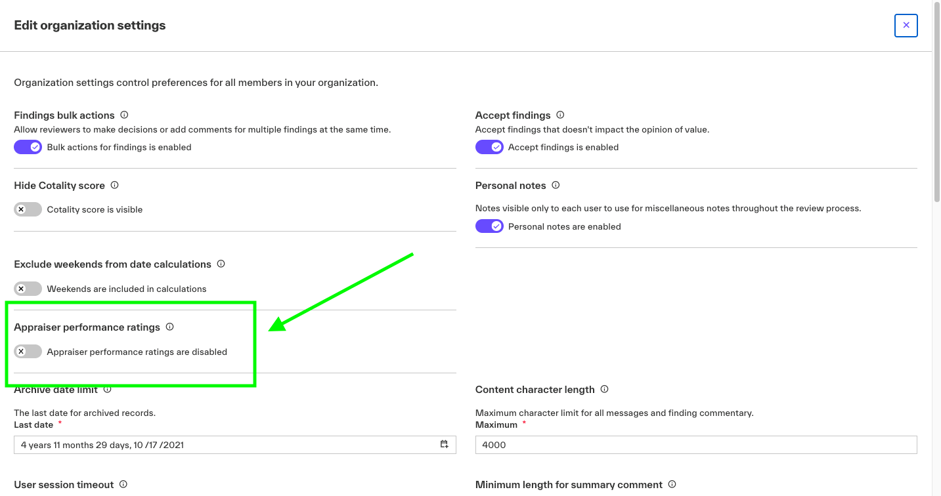
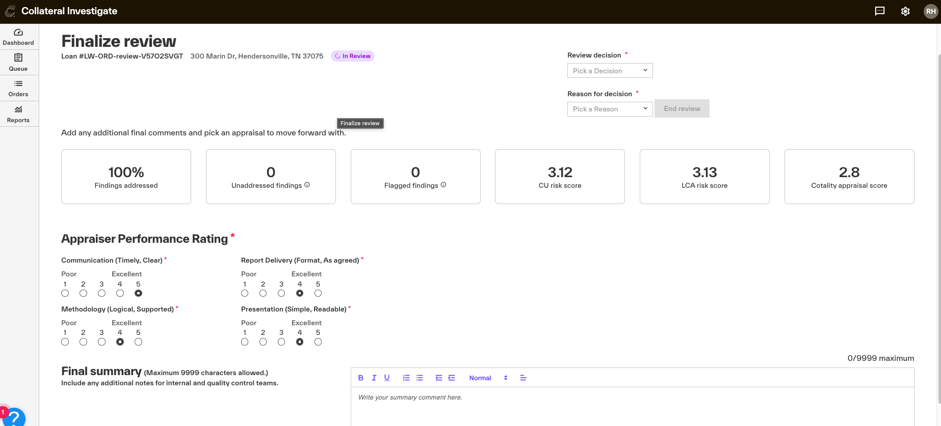
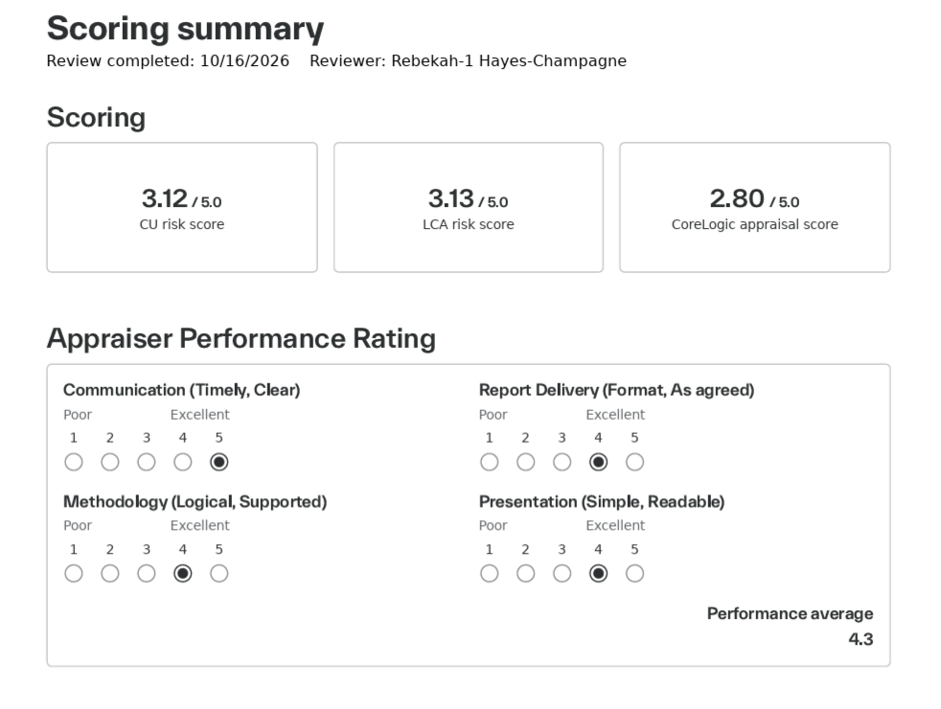
Appraiser rating at finalization (see screenshots)
Review finalization now supports a 1–5 appraiser rating. The rating is also included in applicable PDF artifacts and platform payloads.
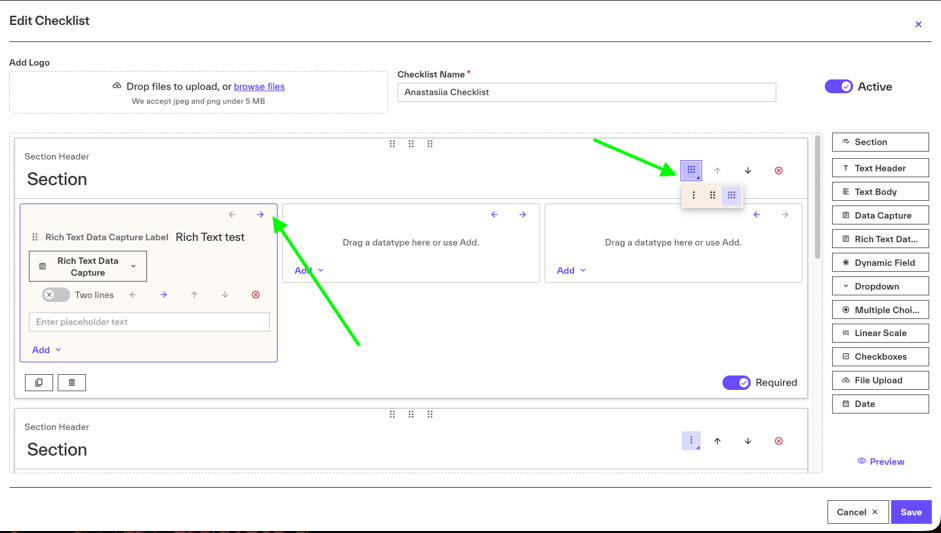
Multi-column checklist layouts (See screenshots)
Individual checklist sections can now use a multi-column layout. The selected layout is supported in the checklist builder, preview, and PDF output.
Finding category filters for artifacts
Artifact configuration now supports filtering by Category in the Findings and Comments section, giving you more control over the content included in applicable artifacts.
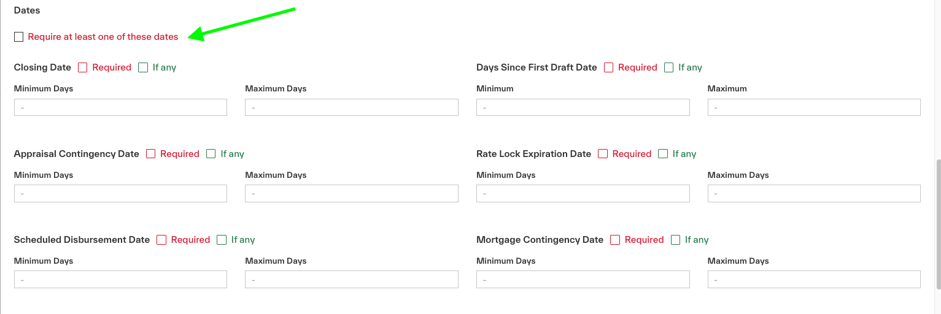
Additional assignment date logic (see screenshot)
The Dates section of Assignment logic now includes a Require any option, providing additional flexibility when configuring assignment criteria.
Helpdesk enhancements
Helpdesk capabilities have been expanded to support:
PNG screenshot exports for Cerebra answers and Assignment log results.
Management of Channels, Customers, and Order Attributes.
Audit log filtering
Artifact settings are now available within the Group filter in the Audit log.
What's changed or improved
Finding comments during revisions
Review finding comments are now handled as revisions are received, improving continuity of finding information across revisions.
Assignment and tier selection
Updated assignment logic to use tier priority after identifying all valid tiers, improving how the appropriate tier is selected.
Platform assignment handling
Assignment processing has been improved to prevent empty assignment details from being sent to connected platforms.
ROV reviewer assignments
Updated ROV workflow processing to prevent Collateral Investigate from incorrectly overwriting reviewer assignments provided by the platform.
Associated files
Associated file information now displays the correct Uploaded by values. Sorting has also been corrected for ascending, descending, and date-based sorting.
Review artifact values
Review artifacts now retain decimal values from appraisal data instead of rounding them.
Final artifact consistency
Updated final artifact processing to address discrepancies in findings and comments between versions.
Revision escalation
Users with the appropriate permissions can now cancel an escalation during a Revision workflow.
Finalization display
The CU score display on the finalization screen has been corrected.
Responsive user experience
Responsive layout improvements have been made across the Collateral Investigate interface to provide a more consistent experience across available screen sizes.
Rules processing
Additional improvements address rules that weren't firing as expected, including non-template rules identified through rules analysis.
Workflow processing
Added support to address SSR requests that get stuck during workflow processing.
What's fixed
Fixed an issue affecting the separation of review data between clients.
Fixed incorrect field highlighting in the Form viewer for applicable rule findings.
Fixed an issue where an order might not move to the appropriate tier after Assignment logic was processed.
Fixed tooltip clipping for the Artifact settings Group filter in the Audit log.
Improved front-end reliability and code quality across the Collateral Investigate experience.
Updated the Members and permissions experience so the Download user report option no longer appears in the Edit modal.
Recommended UAT focus areas
For this release, we recommend focusing validation on:
ROV workflows, particularly checklists, findings, reviewer assignments, and tier selection.
Checklist configuration, including multi-column sections, preview, and PDF output.
Assignment logic, particularly the new Require any date option and tier-priority behavior.
PDF orders, including order identification, Order details, and artifact generation.
Finalization, including the 1–5 appraiser rating and CU score display.
Artifacts, particularly Category filtering, decimal appraisal values, and findings/comments across versions.
Associated files, including Uploaded by values and sorting behavior.
Rules, including expected firing behavior and Form viewer highlighting.
Support
If you encounter any issues or have feedback during UAT testing, please submit a ticket here.
New feature screenshots
In organization settings, you can now turn on Appraiser performance ratings. When this toggle is enabled, it becomes a required step on the Finalize review screen. To see the Appraisal performance ratings in your Review Artifact, you will need to include the Scoring Summary.
You can now use checklist columns to further improve documentation. Go to the Checklist builder and create a new checklist or edit an existing one. (Changes to the current checklist will only apply to new files that have not been reviewed at the time of change.) In the top right corner of each Section, click the columns icon and choose up to three columns for that section. Then use the arrows to move individual fields within the columns.
You can now use all applicable date thresholds, but each file can use only one while still tiering appropriately. Go to Assignment settings, Edit a tier or Create a new one and select the Require at least one of these dates checkbox.