- DATE:
- AUTHOR:
- The Cotality Mercury Network team

UAT release: Enhancements to reporting, order details, assignment workflows, and findings management
The October 9, 2026 UAT release delivers enhancements across assignment workflows, review and findings management, order details, reporting, artifacts, checklist functionality, and rules processing. It also includes usability improvements and targeted fixes to improve reliability and the reviewer experience.
What's new
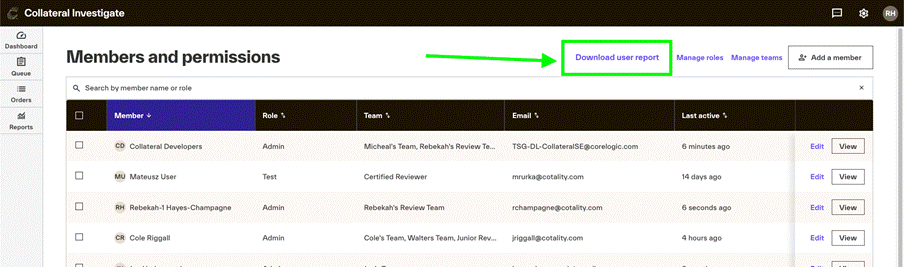
Downloadable user reporting (See screenshot)
A new Download user report option is available from Members and permissions, making it easier to export user information for review and administrative needs.
Loan-to-value information in Order details
Loan-to-value (LTV) information now appears on the Order details screen, adding loan context directly to the order workflow.
Organization-level Cotality score visibility (See screenshot)
A new organization-level setting gives you more control over Cotality score visibility in Order details and reporting.
Direct platform assignment support overrides
Assignment functionality now supports Direct platform assignment as an assignment type.
Additional finalization artifact settings
Artifact configuration has been enhanced to support different settings based on the finalization type, providing greater flexibility in finalization workflows.
What's changed or improved
Improved assignment configuration
The Channel and Customer fields in assignment configuration are now searchable dropdowns, making it faster and easier to find the right values.
New organizations will also default to tier-based auto-assignment, helping provide a more consistent starting configuration.
Expanded file type support
File handling has been enhanced to support platform-provided file types for added files and associated outbound information.
Cleaner Activity log
Activity logging has been refined to reduce redundant entries, making the Activity log easier to review and helping users focus on meaningful order activity.
Review finding protections
Additional validation prevents unsupported actions on Fatal and High severity findings, helping protect critical finding states during the review process.
Expanded rules processing
Enhanced rules processing for ROV, Reconciliation, and Revision requests received through CDG.
Additional rules analysis and coverage improvements have also been completed across:
Rental Information and Reconciliation
Sales Comp Plus and Site
Unit Interior and Project Information
Additional rule scenarios identified through rules analysis
User interface improvements
This release includes several targeted interface improvements:
Improved the tooltip display for the ROV Tier toggle.
Corrected border clipping on finding cards.
Reduced high-priority frontend quality findings to improve overall UI maintainability and reliability.
What's fixed
Resolved an issue that could prevent users from changing decisions on High/Severe findings and incorrectly display a bulk-action warning.
Also removed the Tier filter pill from the All Findings tab to align the filtering experience with the intended workflow.
Resolved an issue affecting the display of inline fields in checklist PDFs.
Resolved an error that could occur when importing Wordsearch content.
Fixed an issue with a specific DRL rule that could cause an error during rules processing.
Removed HTML formatting from messages and comments in outbound status and finalization payloads, providing cleaner content for downstream consumers.
Improved handling when an order URL is unavailable. Users now see an order-not-found notification and are redirected to the Dashboard instead of encountering an incomplete order experience.
Support
If you encounter any issues or have feedback during UAT testing, please submit a ticket here.
New feature screenshots
You can now download a user report to show all permissions, teams, Lending Authority, and access settings for all users. Select Members and permissions from the settings drop-down. Click Download user report.
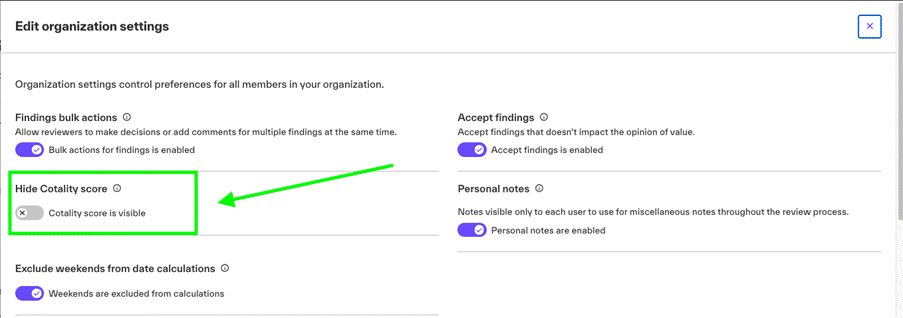
You can now choose to hide or display the Cotality score in Collateral Investigate within Organizationsettings.